Skip to content
No results
Home
Features
How it works
Parent portal
Security
About
Contact
Request a demo
School Manager
Home
Features
How it works
Parent portal
Security
About
Contact
Request a demo
Search
School Manager
Menu
Everything the system does, module by module.
Seven working parts, built around the way Nigerian pre-school, nursery and primary schools actually run a term.
Request a demo
Results and report cards
The part of the term every parent waits for.
Teachers enter CA and exam scores for each subject in their own class, with a remark where needed
Your school sets the maximum marks for CA, attendance and exam for each level
Totals are calculated automatically, and class position can be switched on or off
Class teacher, head teacher and general comments are written for each child, each term
The date the next term begins is printed on the report
Results stay hidden from parents until you publish the term
An optional rule withholds a child's results while fees are unpaid
Every report carries your school's logo, name, address and colours
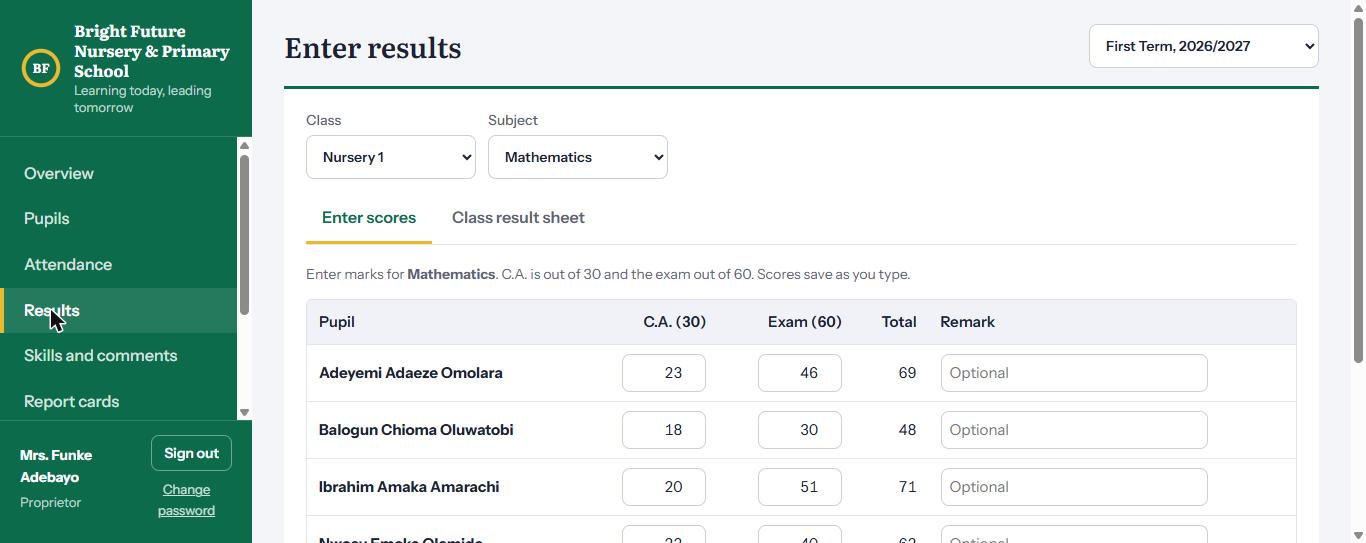
Results: CA and exam scores per subject. Totals work out as you type and save automatically.
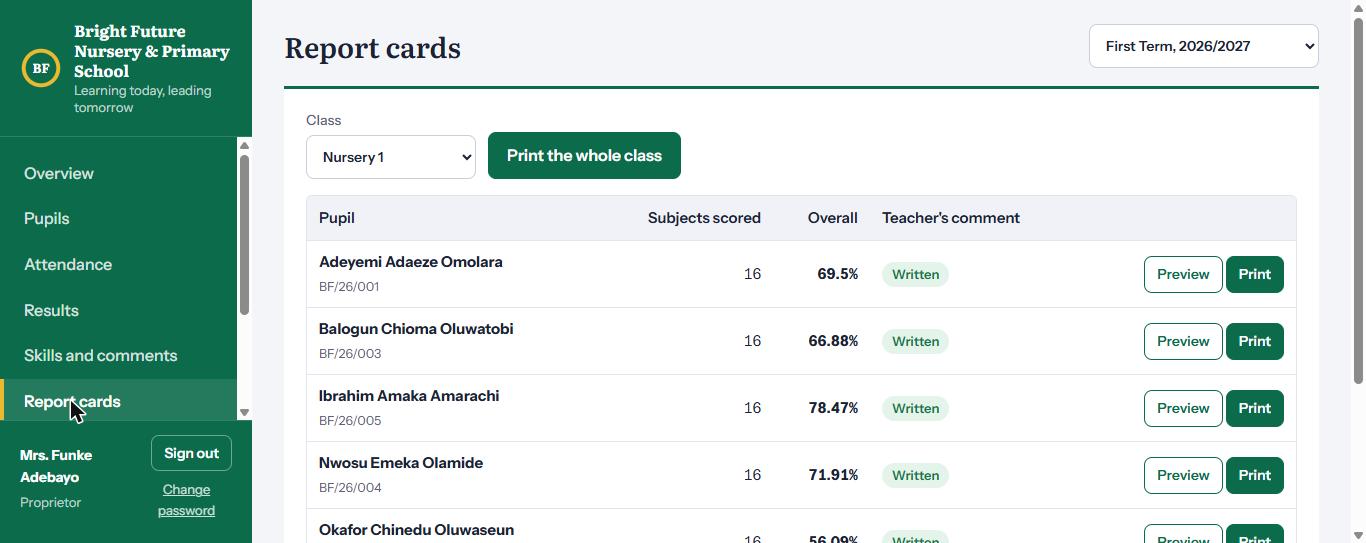
Report cards: overall average per pupil, teacher comment status, preview and print.
Assessment sections for skills, psychomotor and affective areas
Each section holds indicators, and each indicator is rated from 1 to 5
Rating scales carry names your school chooses
Sections and indicators can differ by class and by term
An overall percentage is shown, with no class position
Class teacher and head teacher comments appear on the same report
Skill sheets for creche, nursery and KG
Young children are assessed on what they can do, not on exam marks. The system supports that directly.
Fees and receipts
Know what every child owes without opening a notebook.
Fees are set for each class, for one term or for the whole session, as items such as tuition, books and uniform
Payments are recorded as cash, transfer, POS or other, with a reference and the date
Receipts are numbered in sequence
Part payments are normal, and the balance updates after each one
Discounts and waivers are recorded with a reason, so the balance still adds up
Each pupil has a balance for each term
Every payment shows who recorded it
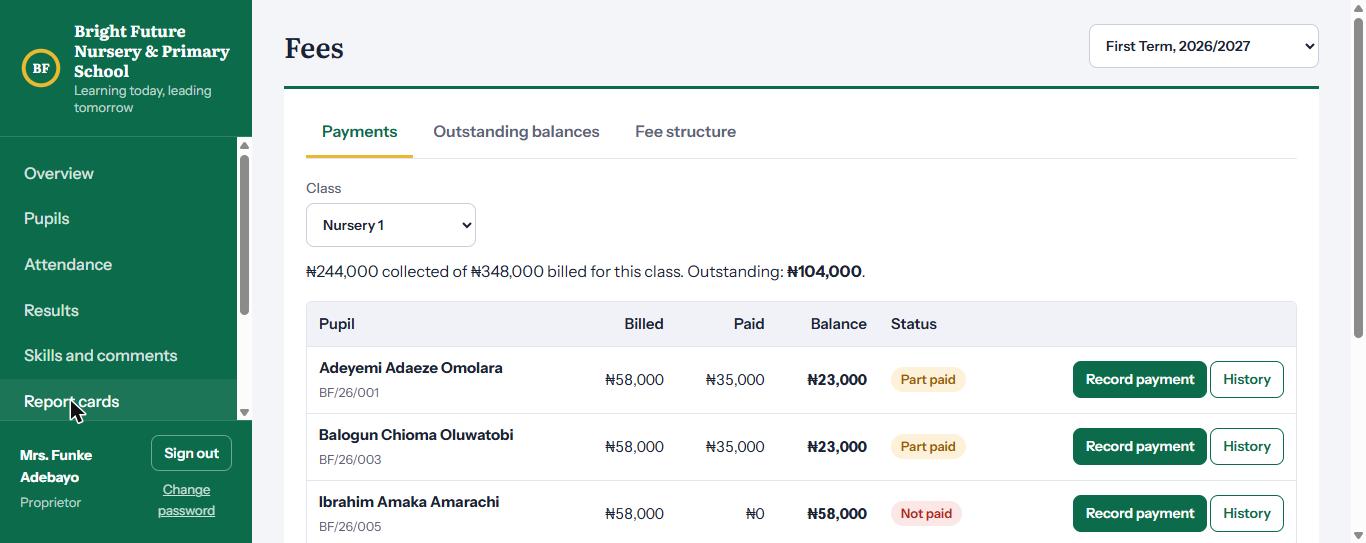
Fees: what each pupil was billed, what has been paid, and the balance. Record a payment or open the history from the same row.
Set the school days for each term
Mark only the days a child was absent or late
Everyone else is counted present, so there is nothing to tick for a full class
Totals reach the report card automatically
If your school gives marks for attendance, they are included in the total
Attendance
Record the exceptions, not a full register.
Pupils and parents
One record per child, and one record per family.
Each child has an admission number, first name, other names, surname, gender, date of birth, and class
Status is active, graduated, withdrawn or transferred, with the date and reason when a child leaves
Parents are recorded with name, phone, WhatsApp number, email and address
A parent with several children in the school is recorded once and linked to each child
Classes follow a fixed order, and that order is also the promotion order
Parents see their child's report card once the term's results are published
They see the current fee balance
They see the school's announcements
Nothing can be changed from the portal
Parent portal
A read-only page for parents, opened with an access code.
How the portal works
Staff and roles
Four roles, each with its own job.
Proprietor, admin (often the headteacher), bursar and teacher
Only the proprietress adds staff, assigns roles and sets each person's first password
A class teacher is assigned to each class
A staff member who leaves can be made inactive without losing the records they entered
Write a title and a message
Pin an important notice to the top
Set an expiry date so old notices disappear on their own
Parents read announcements in the portal
Announcements
Tell every parent once.
See it working for a school like yours.
Tell us about your school and we will walk you through results, fees, attendance and the parent portal, on a call or in person.
Request a demo
Call +234 907 757 7252
Or write to
hello@schoolmanagement.com.ng
.